
How Marketing Automation Powers an E-Commerce Journey
Every screen a shopper sees - browse, cart, checkout, confirmation, loyalty, support - is also a trigger point. Here's how a typical retail app journey maps to the automations running behind it.
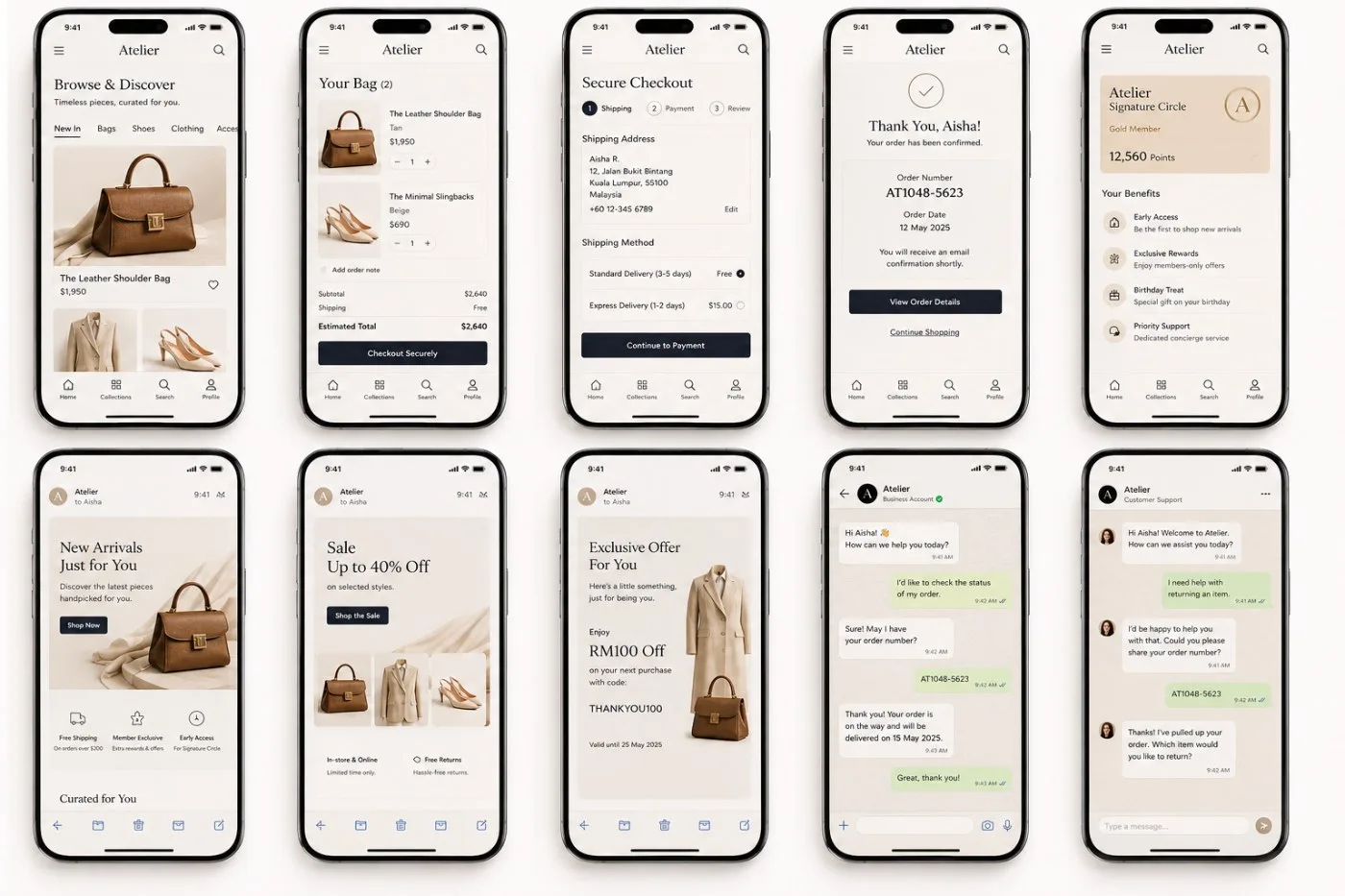
A sample retail app journey - browse through post-purchase support - used to illustrate where automation fires.
A question worth asking about any journey
It's a fair question to ask of any customer journey, not just this one: does it actually fit a marketing automation model, or is it just a sequence of screens someone designed? The two aren't the same thing. A journey "fits" when the moments in it are things a system can detect - a page view, an abandoned cart, a completed order - and when each of those moments has an obvious, valuable message to send in response. Not every flow clears that bar. This one does, cleanly.
Walk through it stage by stage below, then see the annotated trigger map for a single-glance view of what's firing where.
Short answer: yes, it fits
This journey is a textbook lifecycle: acquire, convert, retain, and re-engage. Nearly every screen corresponds to an event a marketing automation platform can listen for - and a message it can trigger in response. Nothing here needs to be built manually or sent one-off; it's the kind of flow that runs on rules once, then works for every customer who matches.
Four stages, one connected funnel
Acquisition. Browsing behaviour is the earliest signal a platform gets - what a customer looked at, how often, and how recently. On its own it's just data; the moment it feeds a segment (say, "viewed bags twice this week, never purchased") it becomes the input for every later stage, including the win-back message that eventually lands in that customer's inbox.
Conversion. Cart and checkout are where most automation programmes earn their keep, because abandonment is common and recoverable. A cart left for an hour and a checkout abandoned mid-payment are different problems with different urgency - treating them as the same trigger is a common mistake that wastes the recovery window.
Retention. A loyalty programme is not a static rewards page - it's a stream of events in itself. Every point earned, every tier crossed, every birthday on file is a legitimate, high-relevance trigger. This is usually the highest-performing segment in a marketing automation programme, because the message is expected and personal rather than promotional.
Service. Support conversations don't originate marketing sends, but they shouldn't be a dead end either. An order lookup or a return request is fresh, first-party signal about that customer's state - it should suppress an ill-timed cross-sell, or seed a better one later.
Mapping the screens to triggers
The pattern: event → segment → send
Behind each screen is the same three-step logic a marketing automation platform runs continuously: capture the event (viewed, added, purchased, points earned), place the customer in a segment based on behaviour and lifecycle stage, and send the matching message on the right channel at the right time.
That's what makes this a genuine acquire-convert-retain-re-engage funnel rather than a series of disconnected screens - and why it's a strong reference journey for planning triggered campaigns, not just one-off broadcasts.
Where this usually goes wrong
The failure mode is rarely a missing platform - most retailers already have one. It's usually that the events above live in different systems that don't talk to each other: browsing data in an analytics tool, cart and order data in commerce, loyalty points in a separate rewards vendor, support tickets in a helpdesk. Each system can trigger its own message, but none of them can see the others, so a customer who just complained about a late delivery still gets the win-back email that assumes they're happy.
Fixing that isn't a marketing automation problem so much as a data and integration one - a single customer record every trigger reads from and writes back to. Get that right first, and the ten screens above stop being ten separate flows and start being one.
What's actually powering it
On Salesforce, this is three products working off one data model - not three separate tools bolted together:
Want a journey map like this for your own funnel?
We'll help you find the trigger points already hiding in your customer journey - and the automation platform to run them.